Data Formats
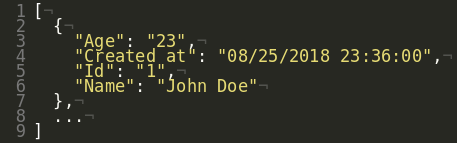
By default, Sheet Best returns rows as a list of records. Pass the optional _format query parameter on any GET to reshape the response. Pass _raw=1 to return native types (numbers, booleans) instead of strings.
The _format parameter
| Format | Mapping |
|---|---|
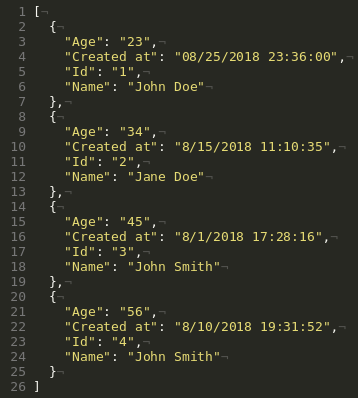
records | [{column: value}, ..., {column: value}] (default) |
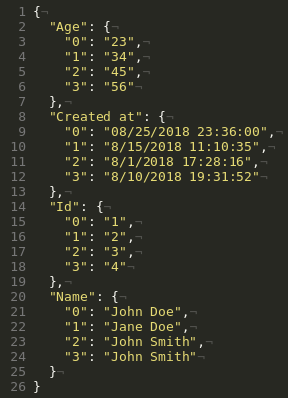
dict | {column: {index: value}} |
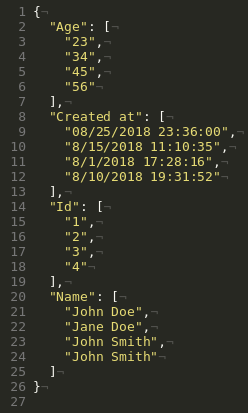
list | {column: [values]} |
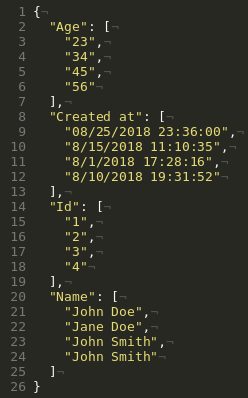
series | {column: Series(values)} |
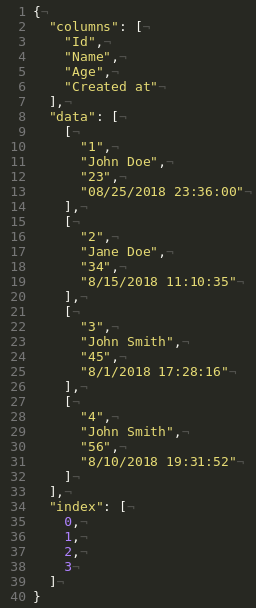
split | {index: [...], columns: [...], data: [...]} |
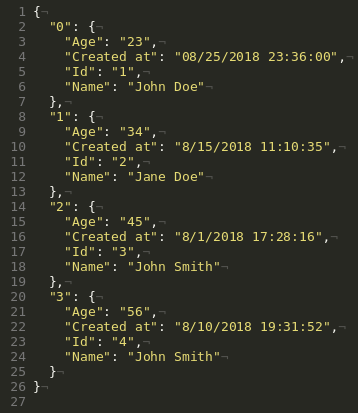
index | {index: {column: value}} |
Example
curl 'https://api.sheetbest.com/sheets/<id>?_format=records'
curl 'https://api.sheetbest.com/sheets/<id>?_format=dict'
curl 'https://api.sheetbest.com/sheets/<id>?_format=list'
curl 'https://api.sheetbest.com/sheets/<id>?_format=series'
curl 'https://api.sheetbest.com/sheets/<id>?_format=split'
curl 'https://api.sheetbest.com/sheets/<id>?_format=index'
Records (default)
Dict
List
Series
Split
Index
Returning native types with _raw
Cell values are returned as strings by default. Append _raw=1 to get numbers, booleans, and other native JSON types instead.
# Default: values are strings
curl 'https://api.sheetbest.com/sheets/<id>'

# Native types
curl 'https://api.sheetbest.com/sheets/<id>?_raw=1'
| Mode | Example value |
|---|---|
| Default (string) | "42" |
_raw=1 | 42 |
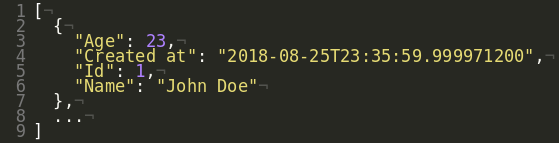
_raw can be combined with any _format value.